Tuesday, 22 January 2013

Motion of an Object II (Assignment)

1. Download the following video from Dropbox using your iPad (procedure to do that can be found here)

  • Dropbox app -> "Y3 LTL Class" -> "Classroom activities" -> "02 Kinematics" -> "20130125 Motion of an object II"
  • Download "table tennis ball.mp4"
2. Complete the following questions:

  • Determine the ball's positions, distance from the starting point of the motion, clock reading and time interval from the start of the video. Record it in a table with the following column headings. (The centre of the ball begins its motion at the position of 2.7 cm when the clock reading is 0 s, each white line represent 10 cm interval on the metre rule)
  • Describe the motion of the ball qualitatively (i.e., with words)
  • Compare with the assignment you have just completed (refer to here), state the difference(s) between the motion of the table tennis ball and the toy cars.
  • Create a possible motion map of the table tennis ball.
  • Use Graphical Analysis app to determine the linearised relation between the distance from starting point (y-axis) and time interval (x-axis).

3. Find a way to put all your work above in a single document (I would suggest Evernote or some handwriting app that you can insert pictures). This is in anticipation of future larger projects and experiment.


Hint to complete the assignment using CoachMyVideo app
Do you need to capture the positions of the ball at equal position intervals?


Creating Motion Maps (Assignment)


  1. Download "02 Motion Map.pdf" (from dropbox -> "Y3 LTL Class" -> "Classroom activities" -> "02 Kinematics"-> "20130122 Motion Maps").
  2. Create the motion maps for the four position vs clock reading graphs 
  3. Use any drawing app (showme app, handwriting app, etc) to create these maps for presentation on the next lesson on 25/01/2013.

Monday, 21 January 2013

Motion of an object (Assignment)

How do you describe a moving object?

Data collection

1. Download the following video from Dropbox using your iPad
  • Dropbox app -> "Y3 LTL Class" -> "Classroom activities" -> "02 Kinematics".
  • Access "Video1.mp4", click the star icon on the top right hand corner to start the download.
  • Once downloaded, click on the "download icon" at the extreme top right hand to "Save to Photo Library".
2. Open the video using CoachMyVideo app to view downloaded video, capture the object's positions and clock readings (the reading on the top left hand).

3. Use Graphical Analysis app to determine the relation between the 2 quantities.

4. Repeat step 1 to 3 for "Video02.mp4" for the 2 moving objects.

5. Take photos of your data collection and screenshots of the graph produced and email to me.

Questions

After completing the data collection and analysis, please complete these questions.

Monday, 14 January 2013

Length Measurements

Reading Assignment

  • Download the notes on "20130114 Y3 Measurement notes 2.pdf" from the shared dropbox folder (refer to your email).

Vernier Callipers

  • Read the section on "Vernier Callipers"
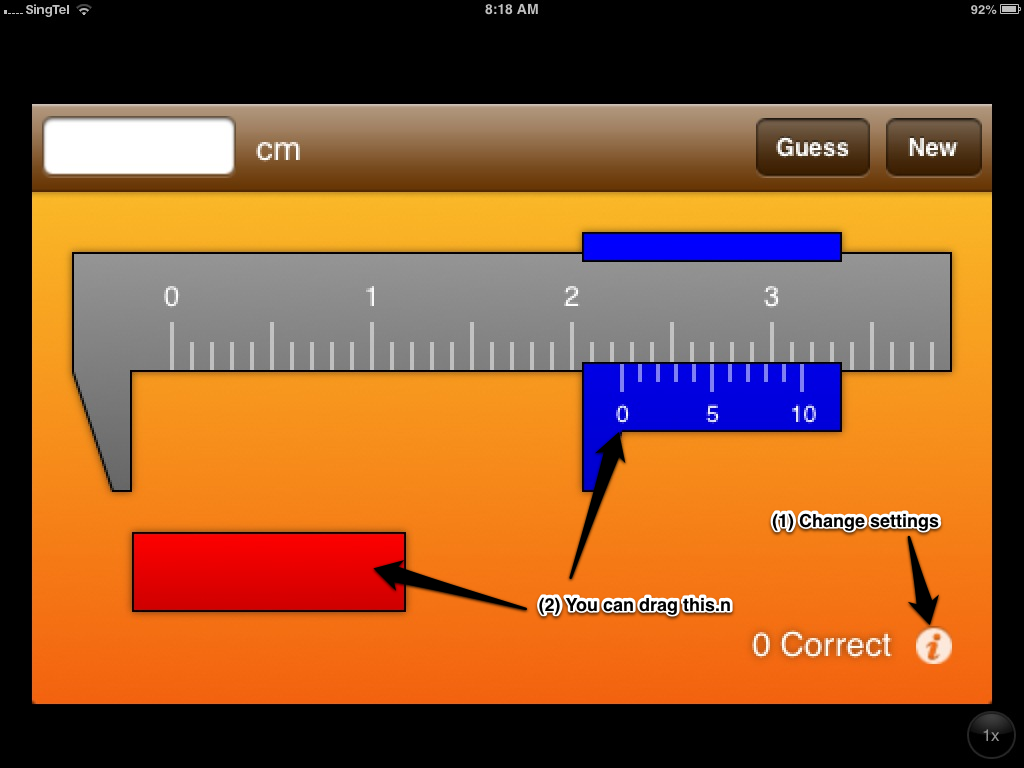
  • Download this iPhone app (http://itun.es/sg/FVJBH.i). Refer to pictures below regarding the setting and how to use the app. Use the app to gain an understanding on how to use the Vernier Callipers.

  • Complete Example 10 and 11.

Micrometer Screw Gauge


  • Read the section "Micrometer Screw Gauge".
  • Watch the following video on how to read micrometer screw gauge


  • Complete example 6 - 9.


Tuesday, 8 January 2013

Motion of a falling object (Measurement practical)

Scenario

An object (eg. a rubber ball) is dropped from the 4th floor.

  • Predict the motion of the ball.

Task

As a group, design a experiment to investigate the motion of a ball dropped from the 4th floor. Appoint a group leader and a scribe/photographer for the activity.In your account youshould pay particular attention to

  • the variables you will consider for falling objects,
  • the apparatus you use,
  • the procedure to be followed,
  • any safetyprecautions you would take,

Represent the data collected in a manner that helps you to justify your predication of the motion of a falling object.

Identify the possible error(s) in your experiment.

(Hint: You will probably need to

  • refer to the height measurement task that you did on Monday 7/1/13
  • use Movie app/CoachMVideo app to capture the fall
  • use CoachMVideo app for frame-by-frame and for position/timing)

Submission

  • Email completed softcopy writeup before 1159 pm on 13/1/13. We need the data for the lesson on Mon 14/1/13.
  • Complete the questions found here before 14/1/13.


Some suggested apps or tools for writeup:

  • Evernote - type, sketch (with skitch), insert photos, etc
  • Note - type only
  • Pic Collage - difficult to type but very good for visual representation using photos
  • Google Docs - easier to use on laptop/desktop, easy to collaborate on the same document

Using CoachMVideo App


Using google drive to manipulate data

You need a Google account, download iOS google drive and log in.

Create "New Spreadsheet"
Use formulae to compute the new cell value